An indoor security camera is useful for checking on pets, keeping an eye on a nursery, or confirming the house is quiet while you are out. Unlike outdoor cameras, indoor models can skip heavy weatherproofing and focus on image quality, two-way audio, and avoiding false alerts from pets or ceiling fans.
What to look for
Decide whether subscription-free local storage matters to you, check for pan-and-tilt capability if you want one camera to cover a whole room instead of a fixed angle, and look at night vision quality, since color night vision (using ambient light or a small spotlight) is now common even at lower price points.
1. eufy Security 4K Indoor Camera S350
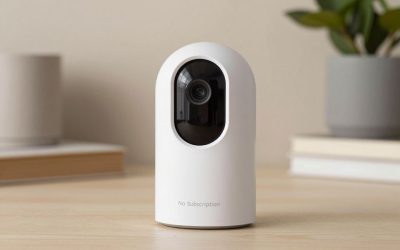
The eufy S350 is frequently cited as the top overall indoor camera, offering 4K dual-camera resolution with no subscription required and local microSD storage, which is a strong combination of image quality and no recurring cost.
2. Wyze Cam v4
The Wyze Cam v4 is the budget favorite, delivering 2.5K resolution and color night vision at a price well below most competitors, making it an easy way to put a camera in every room without a big investment.
3. Blink Mini 2
The Blink Mini 2 is a compact, affordable 1080p camera with a built-in spotlight for color night vision, a good fit for a quick, low-cost camera in a hallway or kids’ room, though it generally requires a Blink subscription for full video history.
4. Wyze Cam Pan v3
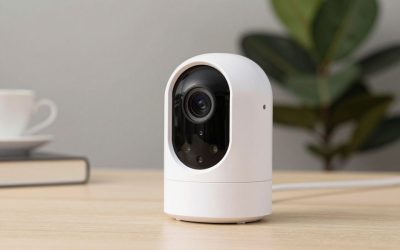
For covering a larger room, the Wyze Cam Pan v3 adds 360-degree pan/tilt tracking at a price around $40, letting one camera follow movement across an entire living room or kitchen instead of staying fixed on one angle.
Check Wyze Cam Pan v3 on Amazon
5. Ring Indoor Cam
If you already use Ring doorbells or outdoor cameras, the Ring Indoor Cam keeps everything in one app and one timeline, with person detection and two-way talk matching the rest of the Ring lineup.
Check Ring Indoor Cam on Amazon
6. Google Nest Cam Indoor (Wired)
The wired Nest Cam Indoor is built for a permanent, always-powered installation and pairs Google’s strong AI-based person/package/animal detection with 1080p HDR video and a wide field of view. Unlike Google’s battery outdoor camera, the wired indoor version skips battery management entirely, which is a real advantage for a camera you intend to leave running continuously in a nursery, living room, or home office. It integrates cleanly with Google Home routines and Nest displays, and keeps three hours of event history free without a subscription.
Check Nest Cam Indoor on Amazon
Buying considerations
Indoor cameras raise privacy considerations that outdoor placement doesn’t, so look specifically for a physical privacy shutter or a software-disable indicator light that’s genuinely hard-wired to the camera sensor (not just a software toggle that could theoretically be bypassed) if you’ll place one in a bedroom or other sensitive space. Field of view matters more indoors than outdoors too — a camera meant to cover a whole living room benefits from a wide-angle lens, while a narrower-view camera is fine for watching a single doorway or crib. Decide between a pan/tilt camera (Wyze Cam Pan v3) that can actively track motion across a room, versus a fixed-lens camera that’s simpler and cheaper but only covers its mounted angle.
FAQ
Are indoor cameras more of a privacy risk than outdoor ones?
They can be, since they see inside your living space — look for cameras with a physical lens cover or a hardware-level disable switch, and review each brand’s data handling policy if that’s a concern.
Do indoor cameras need a different mounting approach than outdoor ones?
Generally simpler — most indoor cameras use a small stand or adhesive mount rather than the more weatherproof hardware mounting outdoor cameras require.
Can pan/tilt cameras track a moving person automatically?
Yes, models like the Wyze Cam Pan v3 can physically rotate to follow detected motion, which is useful for covering a larger room with one camera instead of needing multiple fixed cameras.
Combining indoor and outdoor cameras in one system
Most households eventually want both indoor and outdoor coverage, and choosing both from the same brand (eufy, Wyze, Ring, Arlo all sell both) keeps everything in one app with a unified timeline and shared subscription if you choose a paid plan, rather than juggling separate apps for indoor versus outdoor cameras. If budget is tight, prioritize outdoor coverage first for security deterrence and package monitoring, then add indoor cameras for specific needs like monitoring a nursery, pet area, or a secondary entry point that outdoor cameras don’t fully cover.
FAQ
Is it better to stick with one brand for indoor and outdoor cameras?
Generally yes for convenience — a single app, unified notification system, and potentially a shared subscription plan simplify management considerably compared to running separate ecosystems for indoor and outdoor coverage.
How many cameras does a typical home security setup need?
Most homes benefit from 2-4 cameras covering main entry points (front door, back door, driveway) plus any specific indoor areas of concern, though needs vary significantly based on home layout and specific security priorities.
Battery versus wired indoor cameras
Indoor cameras split into battery-powered models (easier to place anywhere, no cord management, but need periodic recharging) and wired models (permanent power, ideal for a fixed location like a nursery or home office where moving the camera later isn’t a priority). For most indoor use cases where a nearby outlet is available, a wired camera is the lower-maintenance choice simply because there’s no recharge cycle to manage, reserving battery-powered indoor cameras for spots genuinely far from any outlet.
Final thoughts
For the best mix of image quality and no subscription, the eufy S350 is the strongest pick. If you are outfitting multiple rooms on a budget, Wyze Cam v4 is hard to beat, and the Pan v3 is worth the small upgrade for larger open rooms.
Write Your Review
No reviews yet. Be the first to share your experience!